
 AsyaTicari
 AsyaRestoran
 AsyaOtel
 AsyaCrm
 AsyaKlinik
 AsyaSpor
 AsyaSSH
 AsyaEmlak
 AsyaFilo
 AsyaPuantaj
 AsyaİSG
 AsyaİHD
 Kolay Öğren
AsyaSSH · Automotive
Vehicles
Vehicle cards of the auto service: plate, owner, mileage, inspection / insurance expiry dates and service history.
The Vehicles screen is the asset list of the automotive service branch. A card is created for each vehicle that comes in; the vehicle is chosen from this list when opening a work order. The screen is only available if the automotive branch is enabled for your company.
asyassh · /
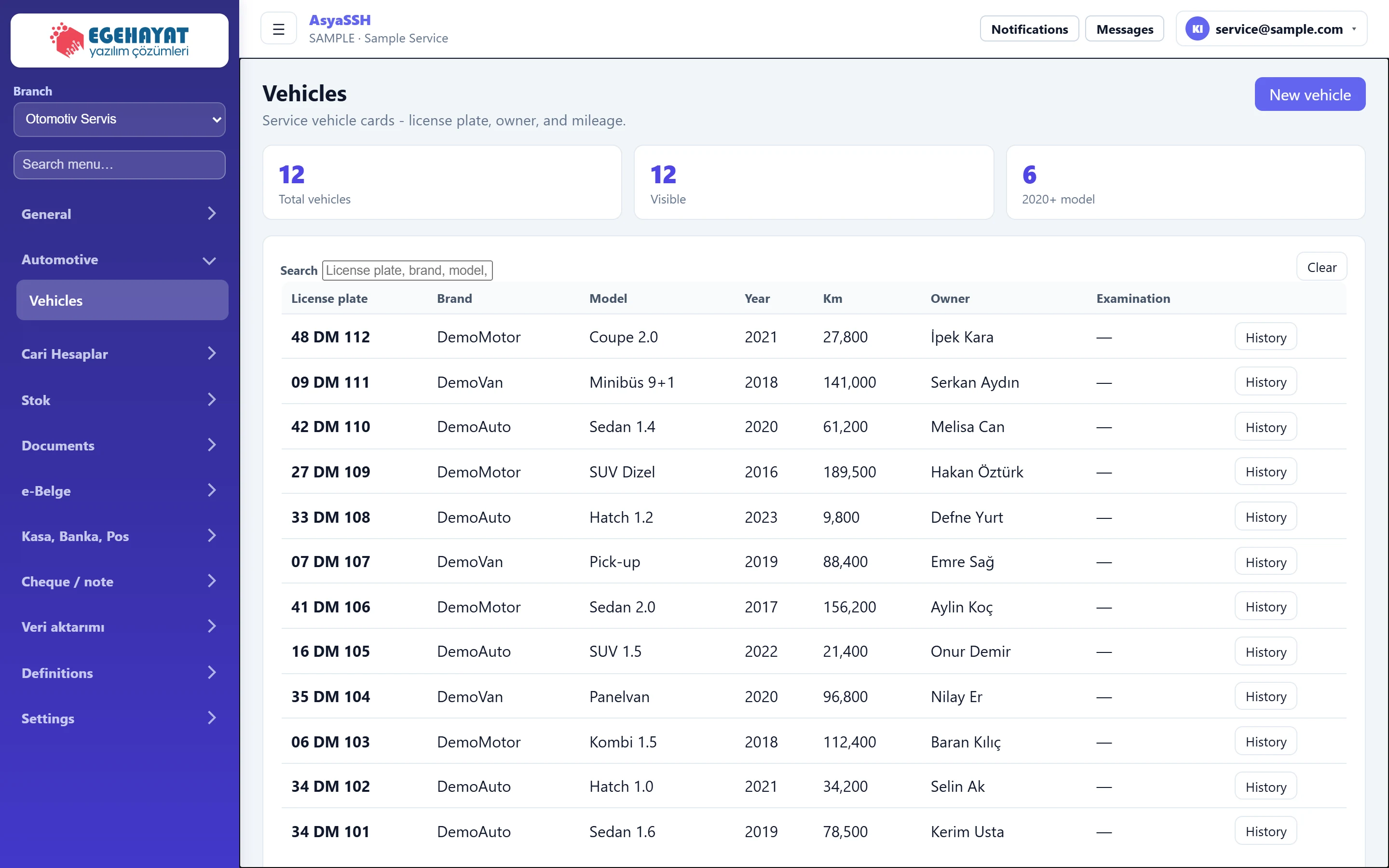
- 1New vehicle Shows / hides the new vehicle form.
- 212 Number of registered vehicles.
- 312 Number of vehicles matching the search.
- 46 Vehicles of model year 2020 or later.
- 5License plate, brand, model, owner... Searches by plate, make, model, owner, phone or VIN.
- 6Clear Clears the search.
- 7Examination Inspection expiry date.
- 8History Shows the vehicle's service history (work orders).
New vehicle
Part of the screenNew vehicle
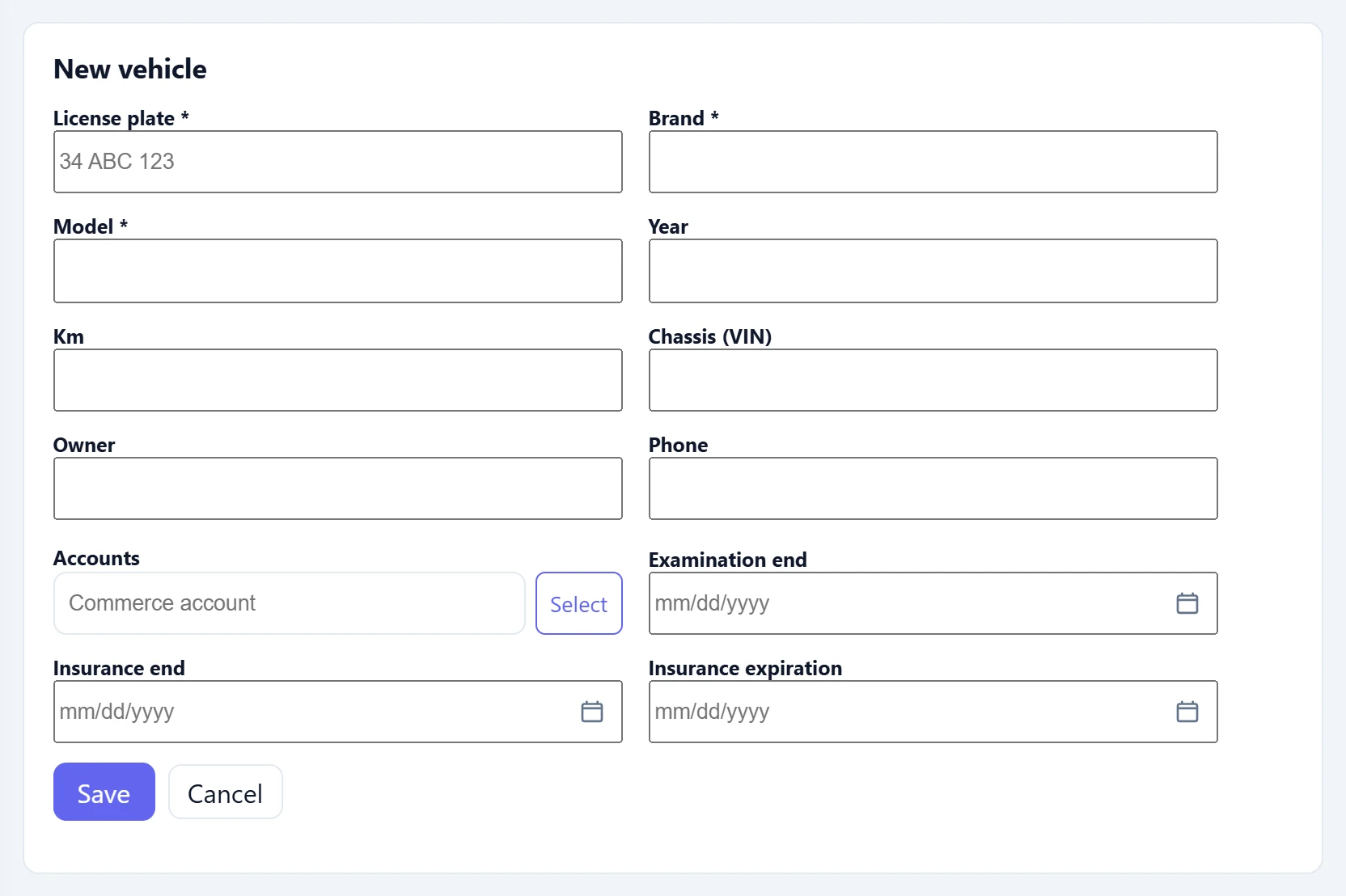
| Field | Sign in | Description |
|---|---|---|
| License plate required | Text | Required. The vehicle's plate. Placeholder: «34 ABC 123» |
| Brand required | Text | Required. |
| Model required | Text | Required. |
| Year | Text | Model year (1980–2100). |
| Km | Text | Mileage at check-in. |
| Chassis (VIN) | Text | Chassis number (VIN); also used in search. |
| Owner | Text | Name of the vehicle owner. |
| Phone | Text | Owner's phone. |
| Accounts | Text | Account card of the owner (pick from the list with Select). Placeholder: «Commerce account» |
| Examination end | Text | End of inspection validity; shown in the list. Placeholder: «mm/dd/yyyy» |
| Insurance end | Text | Liability insurance expiry date. Placeholder: «mm/dd/yyyy» |
| Insurance expiration | Text | Comprehensive insurance expiry date. Placeholder: «mm/dd/yyyy» |
- Press New vehicle.
- Enter plate, brand and model (required); fill in the other fields if known.
- If the owner is a registered customer, link the account card with Select.
- Press Save; Cancel closes the form.
Service history
Part of the screenService history
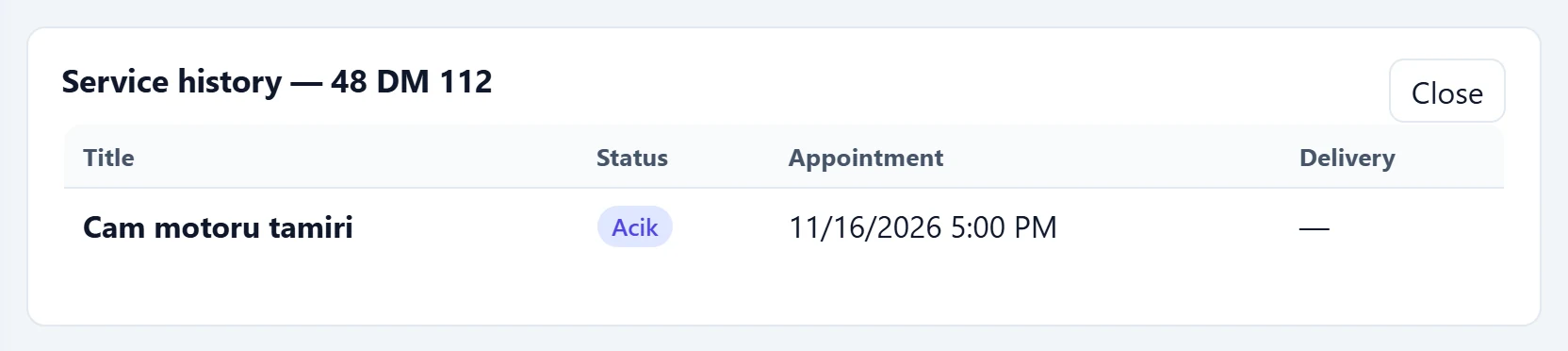
- 1Service history — 48 DM 112 Plate of the vehicle whose history is shown.
- 2Close Closes the history panel.
- 3Cam motoru tamiri Acik 11/16/2026 5:00 PM — Click a row to open the work order card.
- 4Acik Status of the work order.
The History button on a row shows all work orders of the vehicle with status, appointment and delivery time. Click a row to open the work order card; Close hides the panel.
The Search box also searches the VIN, so you can find a vehicle without knowing its plate.
Common messages
| Message | Cause | Solution |
|---|---|---|
| License plate, brand, and model are required. | A required field is empty. | Fill in all three fields. |
| No record found. | The server did not accept the record. | Check the data and try again. |
| No vehicles yet | The company has no vehicle cards. | Add the first vehicle with New vehicle. |
| This screen is not enabled in your company. | The automotive branch is not enabled. | Contact AsyaPlatform to assign the branch. |