
 AsyaTicari
 AsyaRestoran
 AsyaOtel
 AsyaCrm
 AsyaKlinik
 AsyaSpor
 AsyaSSH
 AsyaEmlak
 AsyaFilo
 AsyaPuantaj
 AsyaİSG
 AsyaİHD
 Kolay Öğren
AsyaİHD · SBK / İHD
Incomplete
Completing required SBK information that is empty in the ERP (journal entry, account codes, payment, storage place) by hand.
The Incomplete screen lists the required information that was found empty in the ERP while the files were produced. You enter the value here and save it.
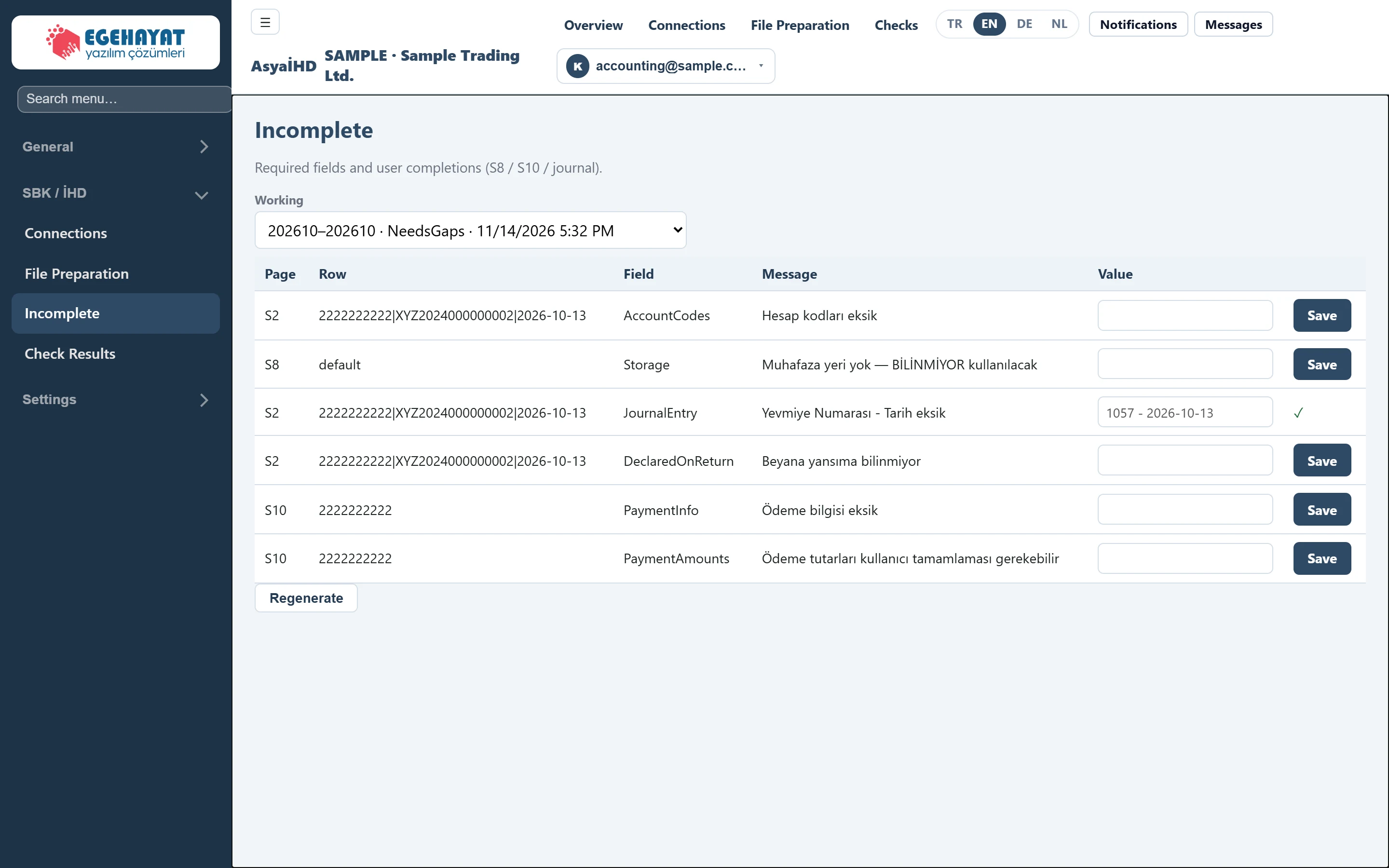
- 1202610–202610 · NeedsGaps · 11/14/2026 5:32 PM Run whose missing items are shown.
- 22222222222|XYZ2024000000002|2026-10-13 Key of the row with the missing item (invoice key or vendor tax number).
- 3Hesap kodları eksik Description of the missing item.
- 4Value Value to fill in.
- 5Save Saves the value; the row is marked as completed.
- 6✓ Completed item; the value can no longer be changed.
- 7Regenerate Regenerates the run from the ERP data.
Choosing the run
The Working list at the top shows period, status and creation time of each run. The screen opens with the newest run; if you come via Missing items on File Preparation, that run is selected.
Missing item list
| Column | Meaning |
|---|---|
| Page | Template with the missing item: S2, S8, S10. |
| Row | In S2 the invoice key (vendor tax number | invoice no | date), in S10 the vendor tax number, in S8 default. |
| Field | Code of the missing field. |
| Message | Description of the missing item. |
| Value | The value you enter. |
Missing items checked during production:
| Sheet / Field | Message (Turkish on screen) | What to enter |
|---|---|---|
S2 JournalEntry |
Yevmiye Numarası - Tarih eksik (journal number and date missing) | Journal number and date (e.g. 1057 - 2026-10-13). If left empty, BİLİNMİYOR is written to the file. |
S2 AccountCodes |
Hesap kodları eksik (account codes missing) | Account codes the invoice was posted to (e.g. 770; 191). If empty, BİLİNMİYOR. |
S2 DeclaredOnReturn |
Beyana yansıma bilinmiyor (unknown whether declared) | Whether the invoice was included in the VAT return. In this version the value is saved but not transferred to the file; the file keeps BİLİNMİYOR. |
S10 PaymentAmounts |
Ödeme tutarları kullanıcı tamamlaması gerekebilir (payment amounts may need completing) | Paid / unpaid amount. In this version the value is not transferred: the file shows paid 0 and unpaid equal to the gross amount. |
S10 PaymentInfo |
Ödeme bilgisi eksik (payment information missing) | Payment method (e.g. Banka Havalesi/EFT). |
S8 Storage |
Muhafaza yeri yok — BİLİNMİYOR kullanılacak (no storage place) | Where books and documents are kept. In this version the value is not transferred; S8 shows BİLİNMİYOR. |
Completing
- Enter the information in the row's Value box.
- Press Save in the same row. “Kaydedildi.” (saved — not translated on screen) appears at the top; the row shows ✓ and the box is locked.
- When all items are completed press Regenerate; the files are rebuilt with your values and Regenerated. appears.
A saved value cannot be changed on this screen. Regenerate rebuilds the missing item list from the ERP data; fields that are still empty in the ERP may show up again as not completed. Where possible, make the actual correction in the ERP.