
 AsyaTicari
 AsyaRestoran
 AsyaOtel
 AsyaCrm
 AsyaKlinik
 AsyaSpor
 AsyaSSH
 AsyaEmlak
 AsyaFilo
 AsyaPuantaj
 AsyaİSG
 AsyaİHD
 Kolay Öğren
AsyaFilo · General
Overview
Counts of vehicles, devices, moving vehicles, open work orders, open alerts and the ERP queue; recent alerts and quick links.
Overview is the first screen after signing in to AsyaFilo. It shows the current state of the fleet as numbers; nothing is changed here. The figures are read again each time the page opens.
asyafilo · /
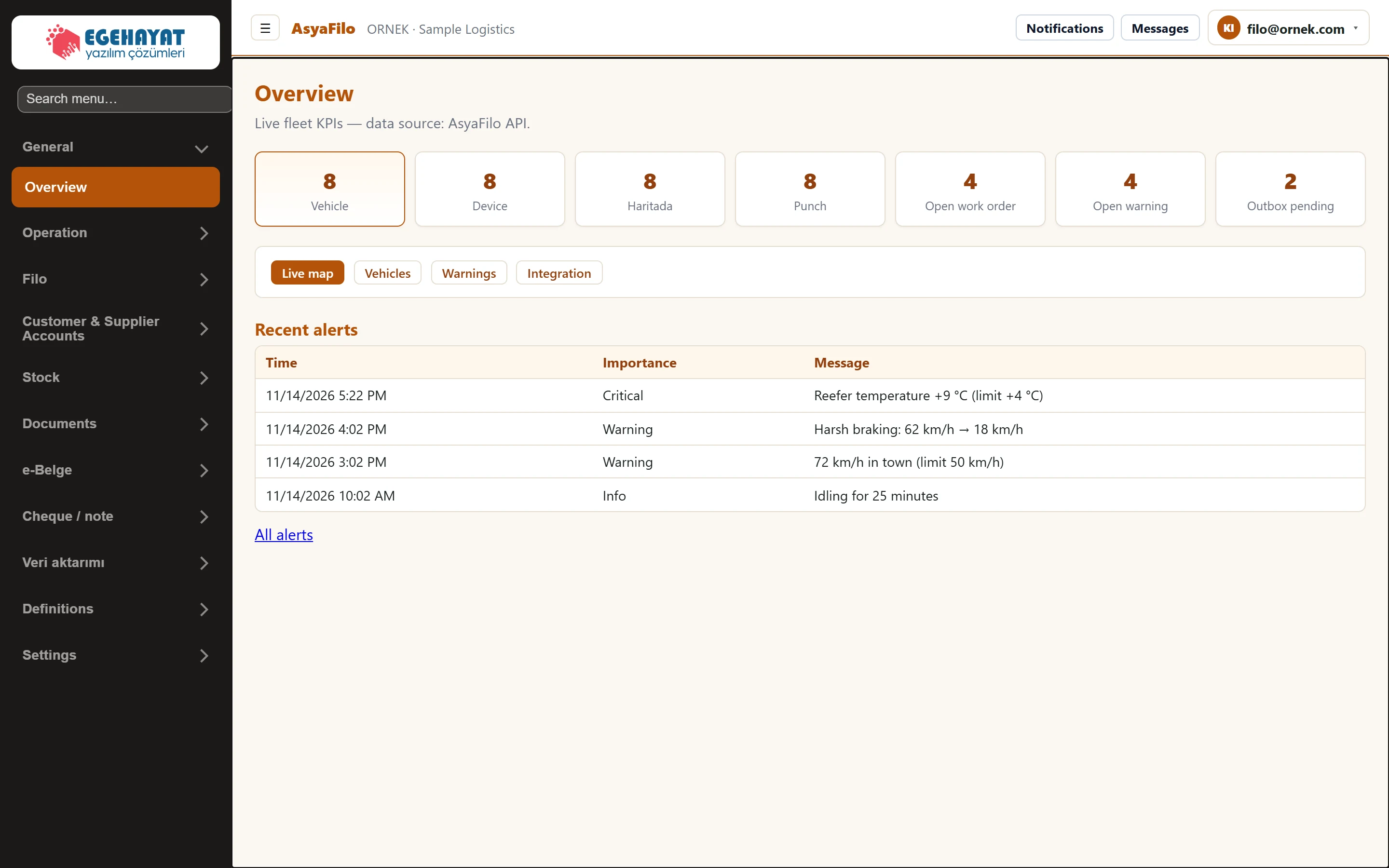
- 1Vehicle Number of active vehicles (deactivated vehicles are not counted).
- 2Device Number of active telematics devices.
- 3On map Number of vehicles with a known last position, shown on the map.
- 4Moving Vehicles whose last reported speed is above 3 km/h.
- 5Open work orders Work orders with status «Open».
- 6Open alerts Telemetry alerts not closed yet.
- 7Outbox pending Records waiting to be transferred to the ERP (Pending).
- 8Quick links Quick links to frequently used screens.
- 9Recent alerts The last 5 open alerts; «All alerts» opens the full list.
Cards
| Card | What it counts |
|---|---|
| Vehicle | Active vehicles. Vehicles set to Inactive are not counted. |
| Device | Active telematics devices. |
| On map | Vehicles with a known last position (shown with a marker on the Live map). |
| Moving | Vehicles whose last reported speed is above 3 km/h. |
| Open work order | Work orders with status «Open». |
| Open warning | Telemetry alerts not yet closed with Close. |
| Outbox pending | Records waiting to be transferred to the ERP (Pending). |
Quick links and recent alerts
- The Live map, Vehicles, Warnings and Integration buttons open the corresponding screen.
- The Recent alerts table shows the 5 newest open alerts (time, importance, message). With no open alert it says so. Use All alerts for the full list and for closing alerts.
If «On map» is lower than «Vehicle», some vehicles have not reported a position yet. Check the device pairing on the Vehicles & devices → Mapping tab.
Common messages
| Message | Cause | Solution |
|---|---|---|
| Overview could not be loaded | The Fleet API did not respond or returned an error. | Reload the page; if it persists, inform your system administrator. |