
 AsyaTicari
 AsyaRestoran
 AsyaOtel
 AsyaCrm
 AsyaKlinik
 AsyaSpor
 AsyaSSH
 AsyaEmlak
 AsyaFilo
 AsyaPuantaj
 AsyaİSG
 AsyaİHD
 Kolay Öğren
AsyaTicari · General Ledger
Posting rules
Account rules deciding which account each document line goes to when posted, and voucher templates per event type.
This screen changed recently. Screenshots will be retaken after the code change of 2026-11-19; the text is current, some images may look outdated.
Posting rules hold the rules of posting. Every voucher line has a role (party, sales revenue, output VAT, stock …). Account rules decide which account each role goes to; Voucher templates decide which roles are debited / credited for an event type (sales invoice, collection …). Without company-specific rules the default rules apply.
Opening the screen
In the side menu click General Ledger → Posting rules.
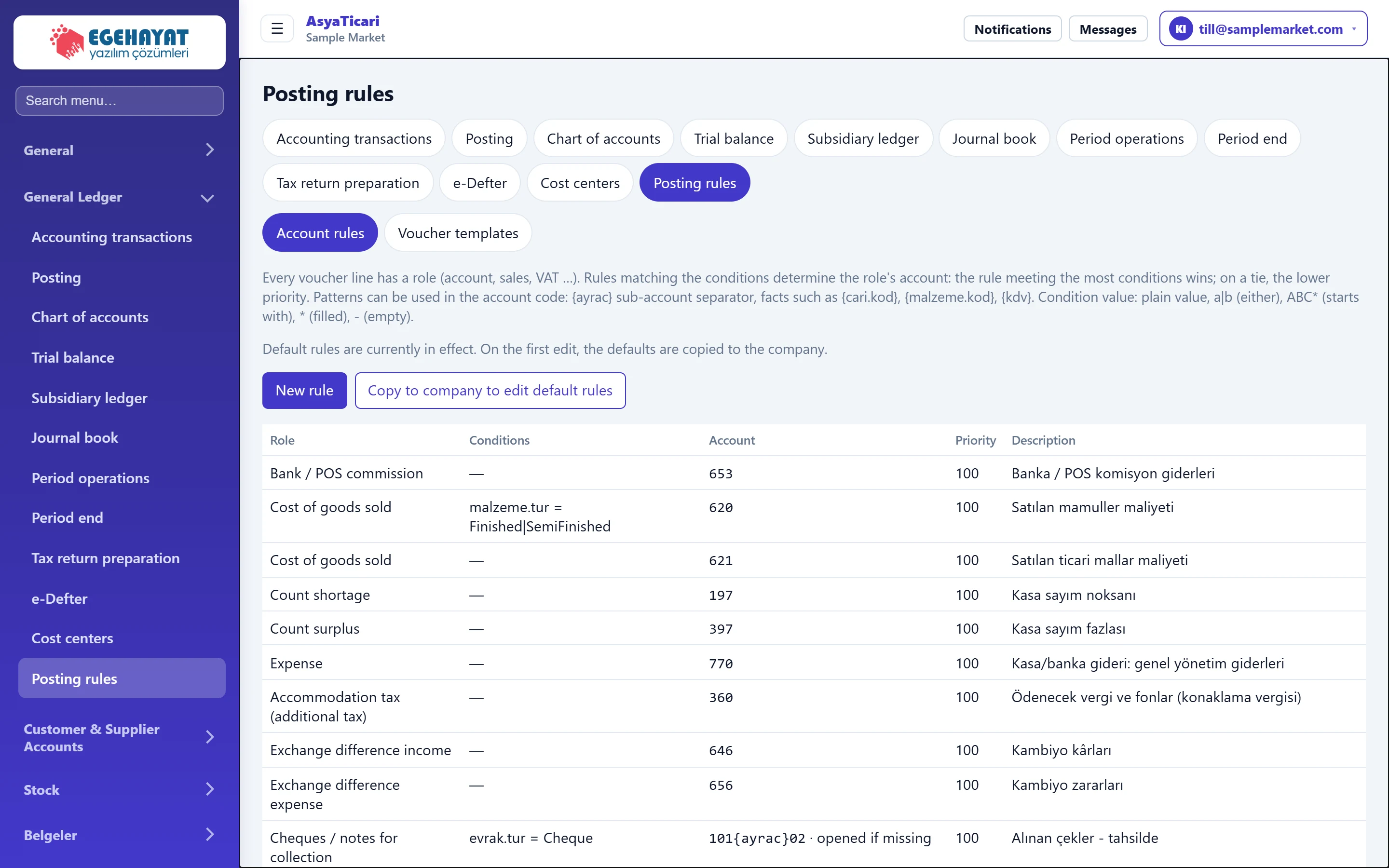
- 1Account rules Rules deciding which account each voucher line role goes to.
- 2Voucher templates Line layout of the voucher per event type.
- 3New rule Opens an empty rule form.
- 4Copy to company to edit default rules Copies the default rules to the company so they can be edited one by one.
- 5Rule list Role, conditions, account pattern, priority.
Account rules
A role can have several rules: the rule matching the most conditions wins; on a tie the lower priority wins. The account code may be a pattern: {ayrac} is the sub-account separator, {cari.kod}, {malzeme.kod}, {kdv} are document facts.
While the default rules apply, the list has no edit buttons. To change the rules, first click Copy to company to edit default rules.
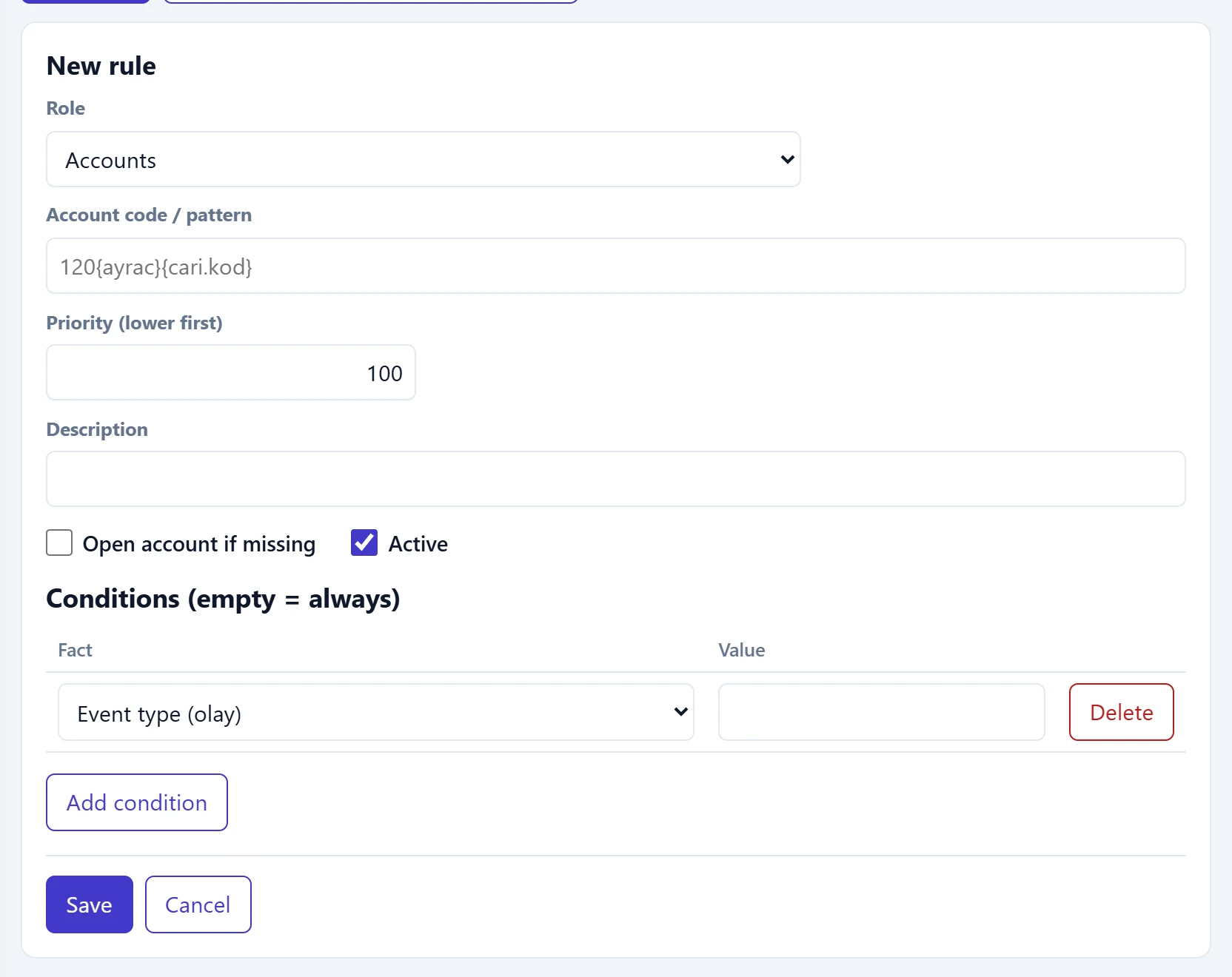
- 1Fact Document fact the condition checks (document direction, party group, VAT rate …).
- 2Value Plain value, a|b (either), ABC* (starts with), * (filled), - (empty).
- 3Add condition Adds a condition row; a rule without conditions always matches.
- 4Save Saves the rule.
| Field | Sign in | Description |
|---|---|---|
| Role | Choice list | Voucher line role the rule applies to (party, sales revenue, output VAT …). |
| Account code / pattern | Text | Account code or pattern; e.g. 120{ayrac}{cari.kod} creates a sub-account per party. Max. 64 characters. Placeholder: «120{ayrac}{cari.kod}» |
| Priority (lower first) | Text | Among rules matching the same number of conditions, the lower priority wins. |
| Description | Text | What the rule is for; shown in the «Why this account» column of the preview. |
| Open account if missing | Checkbox | If the account from the pattern is missing, it is opened automatically during posting (its parent must exist). |
| Active | Checkbox | An unticked rule is not applied and appears faded in the list. |
Condition value formats:
| Format | Example | Meaning |
|---|---|---|
| Plain value | belge.yon = Purchase |
Exactly this value (purchase documents). |
| a|b | malzeme.tur = Finished\|SemiFinished |
One of the values. |
| ABC* | cari.kod = C-* |
Starts with this text. |
| * | hazine.hesap = * |
The fact is filled. |
| - | malzeme.id = - |
The fact is empty (e.g. a service / expense line without item). |
Adding a rule: step by step
- Click New rule and choose the role.
- Enter the account code / pattern (e.g.
120{ayrac}{cari.kod}). - Add conditions with the add-condition button if needed.
- If the account from the pattern should be opened when missing, tick that option and enter the name of the account to open.
- Save, then try a document with the preview on the Posting screen.
Voucher templates
On the Voucher templates tab, choosing an event type shows the voucher's line layout. Lines with a zero amount are not written. Reorder lines with ↑ / ↓, add lines; saving the template writes a company-specific template, and resetting returns to the default.
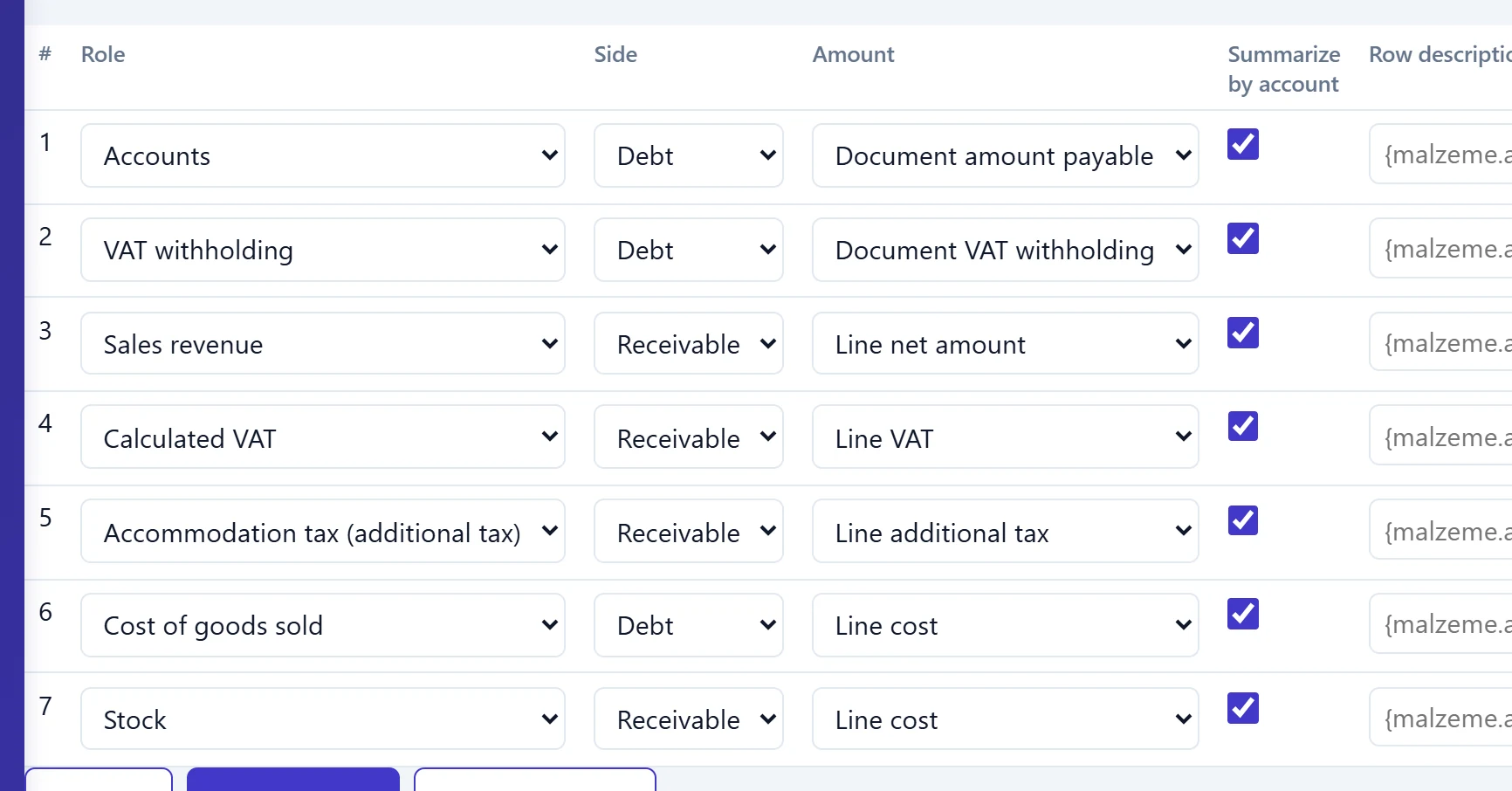
- 1Role Role of the line; the Account rules decide the account.
- 2Side Debit or credit side of the line.
- 3Amount Which document total the amount is taken from.
- 4Summarize by account If ticked, lines falling on the same account are summed into one line.
Template changes affect later postings; if debit and credit become unbalanced, posting fails with an «unbalanced voucher» error.
Common messages
| Message | Cause | Solution |
|---|---|---|
| Account code / pattern is required (max. 64 characters). | Pattern empty or too long. | Enter the pattern. |
| Unknown condition: … | Unknown fact in a condition. | Choose a fact from the list. |
| Conditions are too long. | Conditions exceed 2000 characters. | Simplify the conditions. |
| The company has rules; defaults are only loaded into an empty rule list. | Defaults copied a second time. | Edit the existing rules. |
| The pattern produced an invalid account code: … | The pattern produced an invalid code. | Check the pattern and fact values. |
| Invalid amount source: … | Invalid amount in a template line. | Choose an amount from the list. |